Rendering
Text, menus and action controls should remain readable at your normal zoom. A clipped cashout amount is a reason to stop and resolve the layout.
Mobile access
Looking for a Tower Rush 2 download? Start with browser access, then check what an APK or an operator app actually provides.
Explore this guide By Alex SpencerIndependent game-analysis contributor and editorial reviewer
Searching for “Tower Rush 2 app” or “Tower Rush 2 APK” can lead to different products. Our guide covers the Galaxsys game, not every application using a similar tower-building name.
A browser game, a casino application and a downloadable file carrying the game’s name are not interchangeable. This site distributes no Tower Rush 2 installation package. The existence of a logo on a download page does not establish who published the file.
For a no-install starting point, open the Tower Rush 2 free demo guide. For gameplay differences, compare Tower Rush and Tower Rush 2.
If an operator provides an Android app, obtain its access instructions from that operator’s verified domain or its linked store listing. Compare the app publisher with the operator’s stated business details. Be cautious if a download asks you to disable protections or install unrelated software.
| Check | Useful evidence | Unhelpful shortcut |
|---|---|---|
| Publisher | The operator’s own app page and linked listing | A familiar game logo |
| Permissions | A stated reason for each permission relevant to the app | Accepting every request to get to the game |
| Updates | A documented update route from the same publisher | An anonymous replacement file from a message |
A home-screen shortcut or web app can make an operator website easier to reopen. It still relies on the underlying domain and account service. It does not turn an unknown website into an official standalone Tower Rush 2 app.
Look for supported access instructions on the operator’s site. This guide has no verified standalone Tower Rush 2 App Store listing to recommend, and does not provide a device-management profile or an installation certificate.
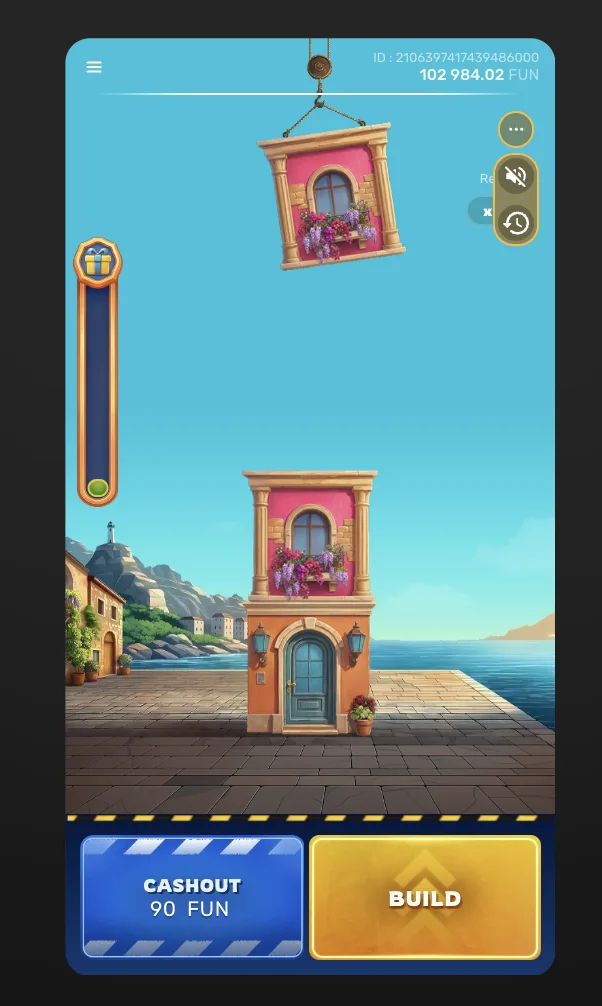
A layout check is separate from a connection guarantee. If the screen freezes during an active round, avoid repeatedly pressing an action while the client’s state is unclear.
Text, menus and action controls should remain readable at your normal zoom. A clipped cashout amount is a reason to stop and resolve the layout.
Use the operator’s connection guidance. The supplied rules describe server-side completion and possible resumption, rather than a guarantee that a local animation is the final result.
Know how to reach operator support and identify a round without sending private account data to a review website.
The portrait frame supports the layout discussion. The PDF’s Internet Connection Quality Information is the source for the distinction between client display and server-side round handling.
Read the supplied Tower Rush 2 rules PDF ↗| Route | What changes | What still needs verification |
|---|---|---|
| Browser | No game installer from this guide | Operator domain, account terms and client rules |
| Operator app | Installation, permissions and updates | Publisher identity and whether the exact game is listed |
| Home-screen shortcut | How the website is reopened | The same underlying website and account conditions |
For account-document and payment questions, continue to registration and verification. For a control-only preview, use the local screenshot walkthrough.
The linked demo runs in a mobile browser. We have not verified a separate official Tower Rush 2 Android or iPhone installer. An operator’s casino app is a different product; verify its publisher and game list separately.
No installation package is distributed by this guide. Verify any operator app through the operator’s own official access route.
No. A website shortcut reflects the underlying website, not independent proof of a game publisher.
Avoid repeated actions while the state is unclear. Record the time and visible round reference, then use the operator’s support and current connection rules.
— Android, iPhone and APK questions separated from demo access.